Xbox Dashboard Redesign
Read time:
6 min
Company:
Xbox
Industry:
Gaming
Start: May. 2022
End: Sept. 2022
Duration:
5 months
As a gamer and a designer, I wanted to take on a personal project that sat at the intersection of both. The Xbox dashboard was something I used every day, and something I heard other gamers complain about just as often. The interface was cluttered, navigation was buried, and the background art was barely visible behind a wall of tiles and advertisements.
I set out to redesign it. Working solo, I ran surveys with 20 gamers, conducted card ranking exercises with 10 participants, and used those findings to inform design decisions from sketches through to a final high-fidelity prototype. The goal was simple: make the Xbox dashboard feel like it was built for gamers, not advertisers.
My Role
This was a solo project from start to finish. I owned every phase: research, design, survey distribution, card ranking facilitation, sketching, wireframing, user testing, iteration, and high-fidelity prototyping in Figma. The gaming community was my research pool. I brought the questions, they brought the honesty.
Problem
Through a survey of 20 Xbox users, one theme came up repeatedly. The dashboard was overwhelming. Users described the home screen as cluttered, confusing, and full of content they never asked for.
The data backed it up. All 20 respondents said they only play one or two different games per week, yet the recently played list displayed seven. Advertisements lived on the home page. Navigation was buried in the bottom left corner with no clear hierarchy. And the background art, one of the most visually distinctive parts of the Xbox experience, was barely visible behind a wall of tiles.
Xbox users were not confused about what they wanted to do. They were confused by an interface that made it harder than it needed to be.


Research
Two methods to understand the community and surface the real pain points.


Solution
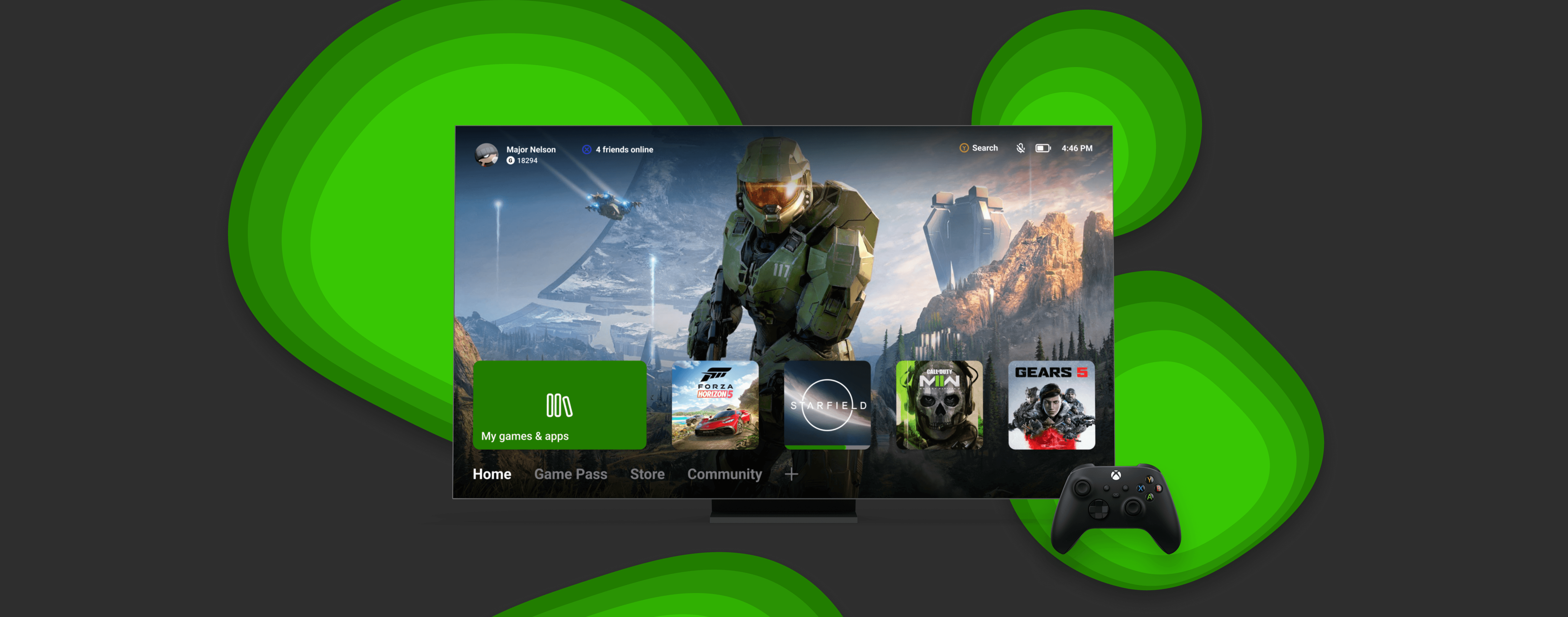
The solution was a redesigned Xbox dashboard that stripped away everything competing for the user's attention. Recently played titles sit front and center, and a horizontal navigation bar replaces the vertical navigation. The horizontal layout maps naturally to the left and right bumpers on an Xbox controller, which players already use to move between tabs. Store promotions and Game Pass content were moved to their own dedicated tabs, giving the home screen a clear, singular purpose.
From sketches to high fidelity prototype.
Click a step to explore
With research findings in hand, the first step was getting ideas on paper. Sketches explored the layout of three key pages: Home, Store, and Library. The goal was to strip the interface back to its core, removing the clutter and rebuilding the hierarchy around what users actually needed.

The research was real. The design was real.
This was a personal project — so while it was never implemented, every decision in the redesign was grounded in real user research.

Personal project — not affiliated with or implemented by Microsoft.